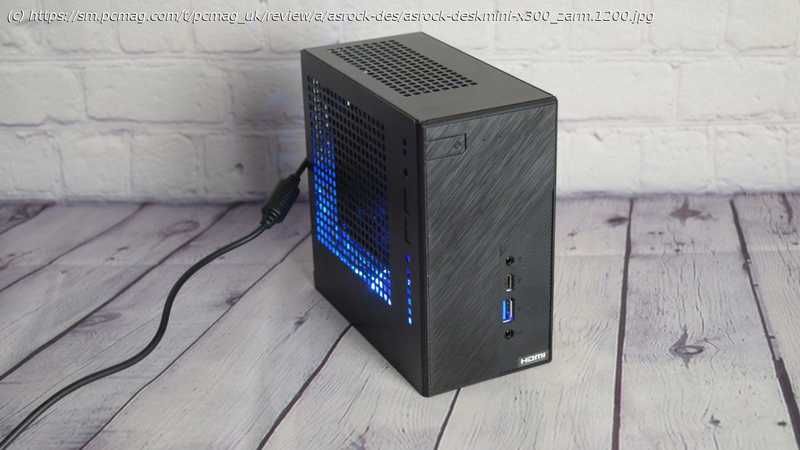
A tiny, unusual AMD-powered PC that can pack decent graphics power
At first glance, Asrock’s DeskMini X300 ($169.99) looks very similar to the company’s other mini PCs, though the front panel has a bit more flair. On the inside, though, the X300 is something else entirely. Unlike Asrock’s other compact desktops, the X300 is based on AMD technology and has completely different strengths and weaknesses. Since it’s a bare-bones system (you supply the CPU, RAM, storage, and operating system), performance will vary greatly depending on the AMD graphics-equipped processor (up to 65 watts) and supporting components that you install. But one thing is for certain: You can squeeze a bit more graphics power out of the X300 given the capability of AMD’s on-chip Radeon graphics versus the integrated graphics on Intel’s equivalent desktop CPUs. The Design: An Unusual Form Factor The DeskMini X300’s motherboard is in the rarely seen mini-STX form factor, which makes it a perfect 5-inch square. Technically, it’s up for debate whether this really should be called a mini-STX board, as that form factor was designed by Intel, but the board is the same size, and it has a similar array of ports. Real estate is at a premium on compact boards such as this one, but Asrock tried to squeeze as much onto the X300 motherboard as possible. The AMD AM4 CPU socket will accept an AMD Athlon or Ryzen APU (that is, a CPU with built-in Radeon graphics) from the “Raven Ridge,” “Picasso,” or “Renoir” families, up to 65 watts. These comprise certain Athlon 200GE series, Ryzen 3 G series, and Ryzen 5 G series CPUs, along with several OEM-only Ryzen Pro G series chips. In addition to the AM4 socket, there are two vertical SO-DIMM memory slots (for compact laptop-style RAM) on the top side of the board, taking up to two 32GB modules for a surprising 64GB possible total. There’s also an M.2 Key-M slot on the top of the board for an SSD, as well as an M.2 Key-E slot for adding a Wi-Fi chip. On the reverse side of the board is a second M.2 Key-M slot and two ports that work as both power and data lines for SATA drives. The case is also able to house two 2.5-inch drives, so between these two drive mounting points and the two M.2 solid-state drive mounts, you can outfit this little box with a really substantial amount of storage. Both of the M.2 SSD slots support PCI Express drives only, up to 80mm long. You’ll get four PCIe Gen 3 lanes on each drive, unless you install an Athlon 200GE series CPU, which will limit one of the slots to two lanes. The case measures 6.1 by 6.1 by 3.1 inches. On the front of the system are two USB 3.1 ports—one Type-A and one Type-C—along with two audio jacks and a power button. The four ports are attached directly to the motherboard and poke through the front of the case. The rear I/O panel has a second USB-A 3.1 port, as well as a legacy USB 2.0 port. There’s not much else on the back panel except an RJ-45 Ethernet jack, a power connector, and three monitor outputs (DisplayPort, HDMI, and VGA). Set around the I/O panel are holes for adding up to three Wi-Fi antennas and a cutout for adding a serial port. The motherboard doesn’t have a serial port header, though, and this appears to be just a holdover from other Asrock DeskMini chassis. On the top of the case are two more cutouts that can be used to add two additional USB 2.0 ports. This system doesn’t ship with the necessary cable and port mount, however, so you won’t be able to use these without locating a compatible USB 2.0 adapter. The rest of the top panel, as well as much of the rear panel, are peppered with holes for ventilation. The onboard audio and networking chips are fairly basic but not problematic. The front audio ports connect to a Realtek ALC223 codec, which is found more often in laptops. The board also has an integrated Realtek RTL8111H Gigabit LAN controller. Neither of these chips is noteworthy, but they worked without issue in my testing. The Building Experience: Bare-Bones to Done Building the DeskMini X300 is an easy and straightforward process. The motherboard comes pre-installed, and the hardest part of the entire process is trying to get the antenna cables clipped onto the Wi-Fi chip—if you have one, that is. As noted, the X300 doesn’t ship standard with a Wi-Fi chip. Asrock does sell one for it, but any M.2 Key-E Wi-Fi module will do.






