The HS02 Pro is plagued by the same potential installation gotchas as Montech’s HS01 Pro, but if you can work around them, it delivers reasonable value for shoppers seeking lots of RGB and a curved-glass design.
Some of the most effective PC cases we’ve tested act like ductwork to deliver air from a cooler place to a warmer one. Visualizing a case as an air guide helps us to understand why some design decisions (say, having extra ventilation holes that cover empty fan mounts) may not always translate to better cooling. For example, we thought the vented mesh face of Montech’s previously tested HS01 Pro might have bled cooling air away from its bottom intake fans that might otherwise have reached our test system’s hot CPU, GPU, and chipset coolers. For a mere $10 more than the HS01 Pro (at least, at MSRP), the company’s HS02 Pro flagship case replaces that mesh face with a curved-glass panel that also helps to put a bigger spotlight on your system’s internal components. Is it more effective? Not really, in our tests—plus, the HS02 Pro has some of the very same “own goal” installation stumbles as the HS01 Pro. Still, this model makes for a slightly better value overall, and a good-looking build, if you’re willing to work with the quirks.Design: Leaving Less to Your Imagination
Concealment of a chunky full-size power supply behind a small portion of its front fan grille was probably the HS01 Pro’s biggest aesthetic accomplishment. PC builders who prioritize the appearance of their internal components, however, may appreciate the way the HS02 Pro’s curved-edge glass face reveals its layout. One simple change helped Montech to target an entirely different market niche: showcase PC builders.
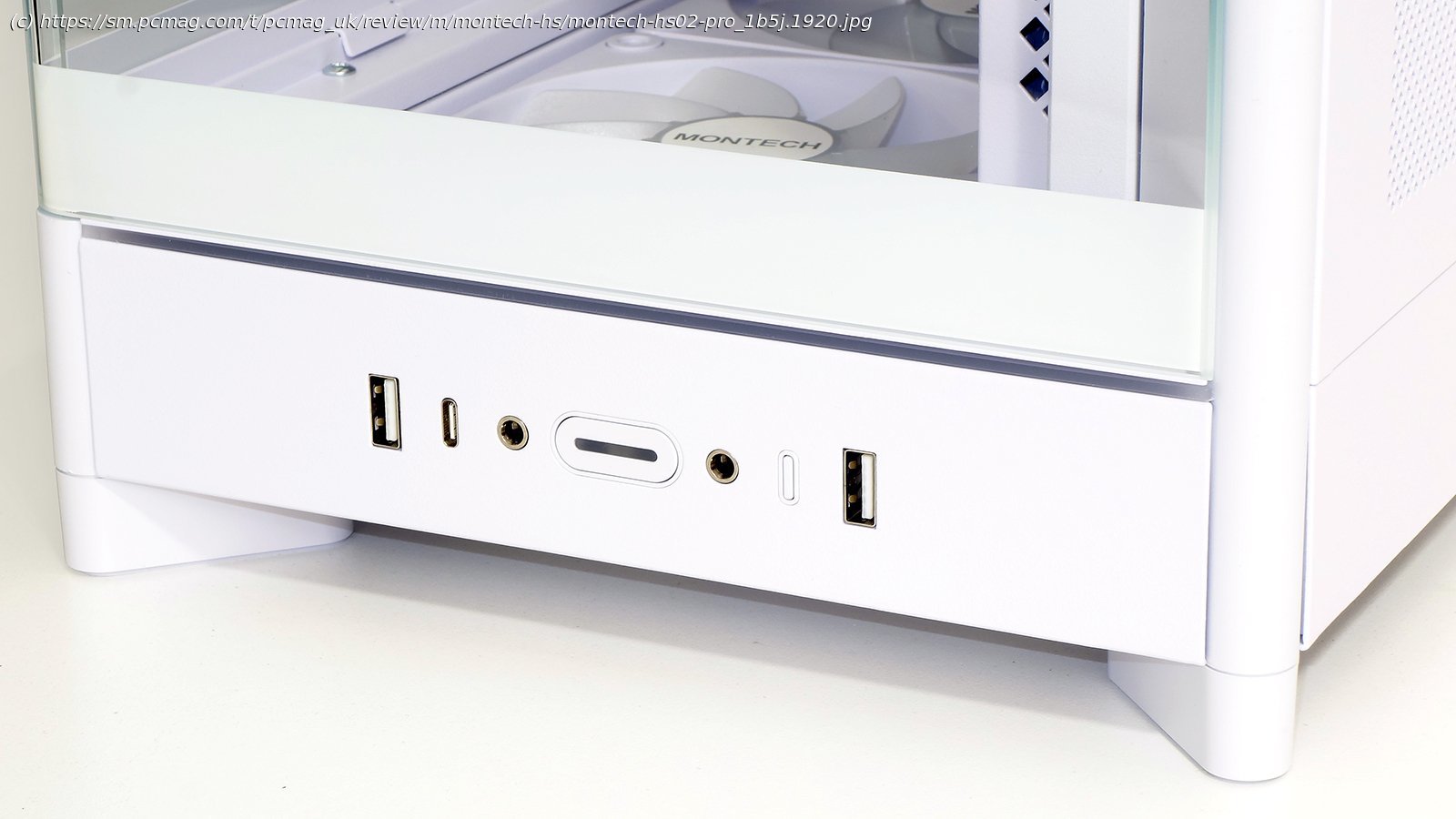
On the mini panel at the bottom of the front face are two USB 3.x Type-A ports and a single Type-C port, separate headphone and microphone jacks, a windowed power button that illuminates when the system is powered on, and a small button for adjusting the integrated ARGB controller. The diffuser of an ARGB light strip is visible above this panel, while beneath it, parting lines for this case’s removable feet are visible.
The HS02 Pro rear panel features seven replaceable slot fillers on a removable subpanel, two 120mm ARGB fans in exhaust orientation, and a receiver jack for its internal power supply extension cable. Though a bit harder to discern at this distance, the rear feet come off in the same manner as the front ones.
Also visible from this angle, a pattern of vents extends down the steel side panel from the HS02 Pro’s up-front internal power supply bay. (More about that later.)
The reason the HS02 Pro’s feet part from the case at the lower edge of its peripheral panels is that Montech designed this chassis to be invertible. Builders may swap the case’s feet onto the vented top panel if they’d prefer their window to face right rather than left. Doing so also places the port section at the top of the case and causes all the components to sit upside-down, which incidentally makes it easier for most users to see their GPU fans. The two magnetic rings seen below are part of the set that attaches the top panel to the bottom, with the other four hidden beneath the feet.