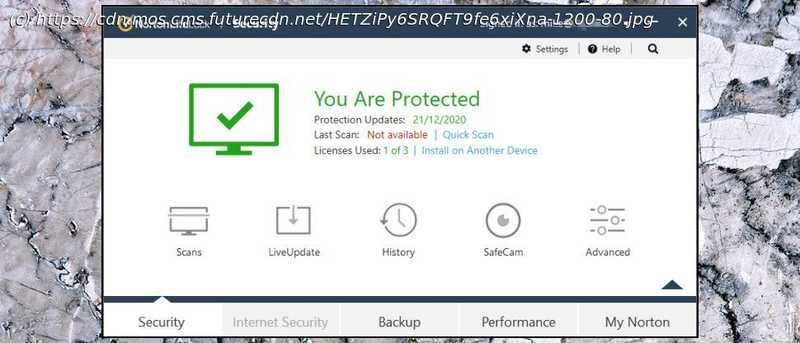
These antivirus solutions provide a great deal of functionality while being laudably lightweight.
First seen way back in 1991, Norton AntiVirus is one of the best-known brands in the security business. The current release, Norton AntiVirus Plus, is a powerful suite that comes absolutely stuffed with high-end features: antivirus and anti-ransomware, malicious URL filtering, an intelligent firewall, password manager, speedup tools, and simple cloud backup with 2GB storage. The package covers Mac as well as Windows, unusually, and a single device, one-year license costs $20 initially, $60 on renewal. That’s fair value for the features you’re getting, but if you’re only looking for the basics, there’s money to be saved elsewhere. Bitdefender Antivirus Plus can’t quite match the Norton feature set, for instance, but it can protect three devices for only $30 in year one, $60 on renewal. Billing is more flexible, too, and you can save money by adding more devices and years to the subscription. AntiVirus Plus is strictly one device, one year. If AntiVirus Plus isn’t enough, the Norton 360 range adds more features and extends support to Android and iOS devices, as well as Windows and Mac. Norton 360 Standard includes unlimited access to Norton Secure VPN (for a single device), protects against unauthorized access to your webcam, and ramps up your online backup space to 10GB. Dark web monitoring is a bonus for US users, alerting you if your email address is being sold online. Despite all this extra power, the suite is still only $30 for a one device, one-year license, $85 on renewal (up $5 since our last review.) If you can live with the single device restriction, that could be worth buying for the VPN alone, at least for the first year- even a value provider like Private Internet Access charges $40 for a one-year license. Upgrading to Norton 360 Deluxe gets you protection and VPN coverage for up to five devices, adds parental controls, and lifts your online backup space limit to 50GB. Looks good to us at $40 for year one, $105 (also up $5) afterwards. The top-of-the-range Norton 360 Deluxe with LifeLock Select is essentially the regular Deluxe package with 100GB cloud storage and, for US users, full identity theft protection: Dark Web monitoring, credit monitoring, real-time alerts, US-based identity theft restoration specialists and a million-dollar insurance package. It’s an impressive package, though with a huge amount of small print to browse (check out the details here.) Norton 360 Deluxe with LifeLock Select is priced from $96 (up $6) in year one, $150 on renewal. It’s fair value, but if you’re after identity theft protection, happy with more basic security and looking for a bargain, check out McAfee Total Protection. It isn’t nearly as powerful as Norton 360 Deluxe, but also includes identity theft protection, and is available from a tiny $50 to cover the first two years ($25 a year), $100 a year on renewal to cover up to 5 devices. Can’t make your mind up? There are 30-day free trials for just about everything available on the Downloads page, and if you sign up and have regrets, you’re also protected by a generous 60-day money-back guarantee. Installation proved straightforward. The only minor issue we had was an installer complaint about a browser extension from a competing security vendor (McAfee) on our system. It didn’t demand we uninstall the add-on, though, and if you’re sure it’s safe, you’re can click the Skip button and watch as the setup process completes. The installation didn’t seem to make any unusual demands on our system resources. It grabbed 1GB of storage space, average for a suite with this level of functionality, and added only two major background processes to our system. Running PCMark Professional before and after installation, though, we found our score dropped by 3.3%. That’s very similar to the results we saw from Avast (3.2%), but more than the performance hit we got from Avira (1.7%), Bitdefender (1%) and Kaspersky (0.6%.) AV-Comparatives’ October 2020 Performance Test also found relatively poor results, with NortonLifeLock ranked 15th out of 17 in terms of its impact on system speed. Malware often attempts to disable antivirus before launching a full attack, so the best antivirus make real efforts to protect themselves from attack. We test this by running various attacks of our own, including closing processes, deleting files, unloading drivers and disabling services. We were able to close the process powering Norton’s user dashboard, but the package’s core files, services and drivers were fully protected, and our security remained active at all times. Norton AntiVirus Plus has an odd interface, split across two windows. Its My Norton screen looks good, but makes poor use of screen real estate, with the bulk of its dashboard taken up by a wallpaper image of someone trekking along a mountain trail, a handful of buttons to launch key tools, and most of the rest being just white space. There’s a lot more functionality and control available, but you must open a separate Security window to access it, and we found it took longer than expected to find our way around Norton’s many features. Antivirus is relatively straightforward, though, with Quick Scans only a click away, whatever interface you’re using. A Full System Scan option is on hand, if you need it. And you can create and save multiple custom scan types, for example to automatically scanning your Downloads folder every three hours, but only when your system is idle and on AC power. Scan times are reasonable, with 50GB of test data taking 29 minutes for the first scan, dropping to 3:30 next time, within the range we’d expect for this type of suite. Bitdefender’s first scan was slower (39 minutes), but it dropped to 27 seconds next time; Kaspersky was fast at an initial 19 minutes, then managed 2:50 on its second run. An option to run Norton’s Power Eraser gets you a more aggressive detection and repair technique which might remove trickier threats. That’s welcome (it’s a capable tool), but you don’t need to buy the package to get it. Norton Power Eraser is available for free on the Norton website. But if you’re unsure whether you’re infected and just want to find out more, a Norton Insight tool reports on the reputation of various files on your system. This works like a security-focused version of Task Manager. The main window lists running processes, with a Trust rating for each, an indication of how many others use them, their system impact and more. This has some major benefits for expert users. Even if you’ve been infected by a threat so new that Norton can’t detect it yet, Insight may still be able to point to a possible issue, highlighting active running processes or loaded modules which you don’t recognize, and it’s never seen before. If you’ve enough Windows experience to go manually hunting for malware, this is a very handy tool to have on your side. AV-Comparatives’ Real-World Protection Test s a comprehensive benchmark which pits 17 of the top antivirus engines against some of the very latest malware. NortonLifeLock’s results have varied a lot in 2020, from 100% protection and second place in the February-May tests, to 99.5% protection and a disappointing eleventh place in the July-October report. AV-Test’s Windows 10 Home User reports are more consistent, with NortonLifeLock earning a maximum six points for protection in all six tests through the last year. We ran some simple tests of our own, using common malware-like tricks to download malicious files with standard Windows tools. Norton AntiVirus Plus performed well, blocking most of our simulated attacks at the behavioral level, before the files could be downloaded. And although it ignored our exploit attempts a couple of times, the file detection layer detected and quarantined the file just as soon as it hit our hard drive. We weren’t finished yet, though. We’ve also created a custom ransomware-like program which spiders through a test folder tree, opening and encrypting common images, videos and document types. As it’s never been released, Norton can’t have seen it before, making this a good test of its ability to detect and block ransomware by behavior alone. We ran our test threat, Norton AntiVirus Plus detected and killed it, and a few seconds later, warned us about the problem. While that’s good, we found our threat had encrypted 57 files before it was stopped. In previous tests we found both Bitdefender and Kaspersky recognized the danger after it had accessed a maximum of ten files.






