A simple and speedy VPN for not-so-demanding novice users.
Kaspersky Secure Connection is a low-cost, easy-to-use and torrent-friendly VPN service from big-name security vendor Kaspersky Labs.
The service is aimed at a non-technical consumer market, and that’s clearly reflected in the website. It explains some general benefits of a VPN – privacy, unblocking websites – but contains almost no details on the number of countries or locations available, the supported protocols, DNS issues, kill switches or anything faintly low-level.
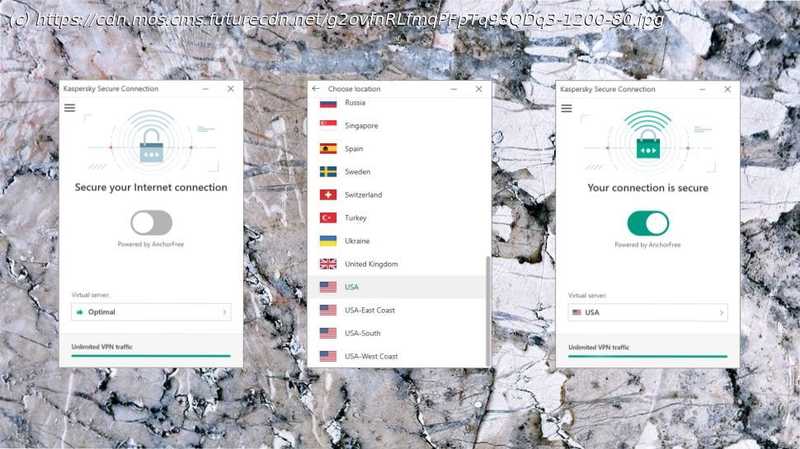
Although one reason for this could be that there’s not a lot to talk about. Secure Connection is powered by Hotspot Shield, and offers a minimal 27 locations spread around the world (Europe, North America, Brazil, Hong Kong, Japan, Mexico, Russia, Singapore). There are a few welcome features, the best being the ability to automatically connect when you access insecure or untrusted wireless networks, but for the most part, Kaspersky keeps options to an absolute minimum.
This does make the apps supremely user-friendly, though, and with downloads available for Windows, Mac, iOS and Android, you can have most devices protected at speed and with the minimum of hassle. (Unfortunately, there’s no way to set up the service manually, on a router, Chromebook or anything else – you can only access Secure Connection from the official apps.)
Kaspersky Secure Connection has an extremely limited free plan where you can’t choose your location and are restricted to 200MB of traffic a day (300MB if you register, or you already have a My Kaspersky account).
This isn’t quite as bad as it sounds. Even that 200MB per day translates to around 6GB a month without requiring handing over any personal data. But such a low daily limit means you’ll struggle if you want to download or stream very much, and if you’re willing to hand over your email address, there are better options around (Windscribe’s free account gives you 2GB a month, but rises to 10GB if you register.)
Fortunately, the picture improves significantly if you sign up for a paid monthly account. This gets you unlimited data use, full access to all locations and support for up to five simultaneous connections, all for the very low price of $4.99. Buying a monthly account direct from Hotspot Shield costs $12.99.
Pay for a year upfront – card or PayPal supported – and the price plummets to an effective $1.67 a month. That’s a fraction of what you’ll pay if you go direct to Hotspot Shield, where the annual plan costs a chunky $7.99 a month. Hotspot Shield’s clients have more power and features, but Kaspersky Secure Connection gives you access to some of the same locations, and all the same performance, for a fraction of the price.
It’s always difficult to know whether you should trust any VPN provider with your privacy, and this is especially true with Kaspersky, after the US government announced it was banning the use of Kaspersky software on sensitive government systems (Pentagon, GSA, NASA).






