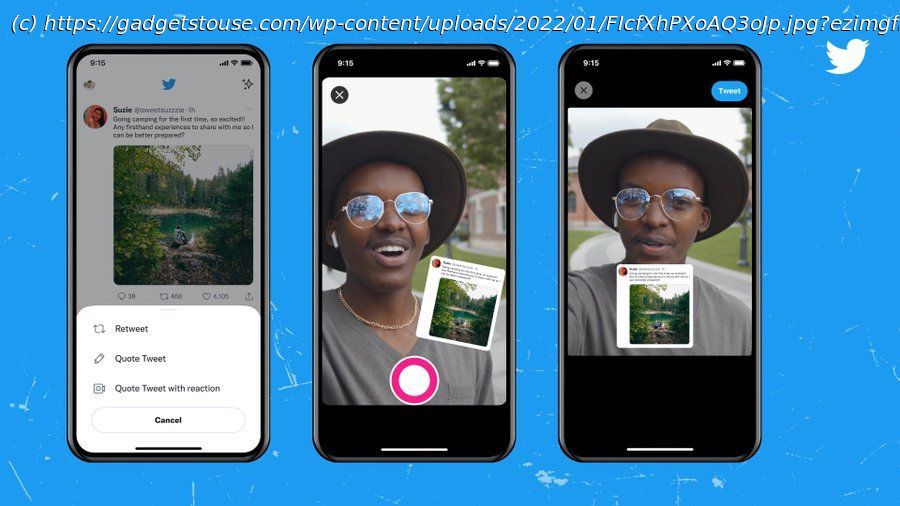
In this guide, I’ll tell you how you can quote retweet with photos and videos on the Twitter app.
Twitter keeps updating its app to add new features that help users to express their thoughts in a better way. Earlier Twitter announced a feature that let users retweet tweets without comment and now it is adding a new feature to this. You can now add reactions while retweeting. In this guide, I’ll tell you how you can quote retweet with photos and videos on the Twitter app. Also, read| 2 Ways to Share Someone’s Twitter Video without Retweeting Twitter is currently testing this feature for iPhone users so probably not all Twitter users will see it as of now. But soon it will be rolled out to all users. Here’s how this feature will work. 1. Open Twitter app on your iPhone and go to that tweet that you want to retweet. 2. Now tap on retweet button and then from the pop-up menu, select “Quote Tweet with Reaction”. 3. On the next page, select your photo or video from your gallery. 4. After that, retweet your tweet with a comment or without it. Source: Twitter This way you can retweet a tweet with your photo or video reaction. If you don’t see this feature as of now, this will come as an update to your phone so keep checking the App Store. You can also send a normal retweet without any comment. Follow these steps: 1 Open Twitter and tap on the Retweet button below any tweet on Twitter website or mobile app. 2. Twitter will open the ‘Quote Tweet’ box and you will need to add a comment. 3. Well, here you just don’t type anything and tap on the “Retweet” button. That’ it, your tweet will be sent without any comment. For more such tips, stay tuned!