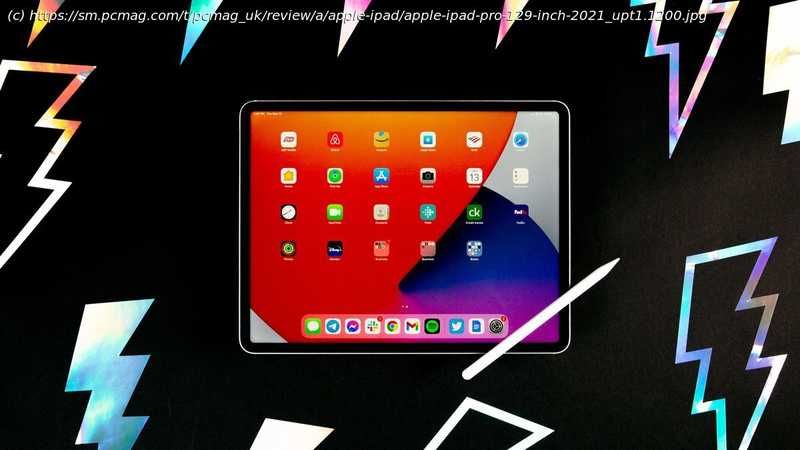
A slick, powerful tablet held back by its OS
The new iPad Pro is too good for its operating system. An absolute hardware tour de force, this $1,099,12.9-inch tablet is gorgeously built, with power to match the latest Apple laptops, the finest screen we’ve ever seen on a slate, and connectivity options that the latest MacBooks can’t touch. But iPadOS can’t take advantage of the new power under the hood, which means the $599-and-up iPad Air is still our Editors’ Choice winner for Apple tablets. A Tablet With Laptop Power, at Laptop Prices There are two models of the new iPad Pro. The 11-inch model starts at $799, and the 12.9-inch model starts at $1,099. We’re reviewing the larger model, which is the only one with the new XDR Mini LED display. They both come in gray or silver. The 12.9-inch model measures 11.04 by 8.46 by 0.25 inches (HWD), and its weight of just 1.5 pounds belies its speed and power. You’re unlikely to pay just $1,099 for this tablet. That price is for a 128GB model, and you’ll probably overrun that with large media files after a year or so. The Pro can use external storage, but in iPadOS, external drives are second-class citizens that can’t be used directly by some apps, so you want that internal storage. Hard drive options include 256GB (for an extra $100),512GB ($300 more),1TB (add $700), and 2TB (add $1,100; totaling two times the entry-level cost). The metal back panel shows the two rear cameras and the LiDAR sensor. But wait, there are more add-ons. Adding a 5G modem costs another $200, not including the price of a prepaid eSIM or monthly service plan. The Apple Pencil is $129. A good keyboard case from Apple or a reputable third party like Logitech will run you $200 or more; the Magic Keyboard with trackpad that Apple sent us along with our test unit costs $349. You can reuse some accessories from earlier iPad Airs and iPad Pros, including last year’s Magic Keyboard With Trackpad and second-generation Pencils, but it’s still perfectly possible to head into an Apple Store intending to buy an iPad Pro and walk out $2,000+ lighter. That changes the whole equation of what the iPad Pro is and who it’s for. A $2,000 device should be able to serve as your primary computer, and it has to do more than a $1,000 laptop or desktop can do. The M1 chip in this generation of iPad Pro indisputably has that capacity, but iPadOS doesn’t take advantage of it. A New Vision The XDR display on the 12.9-inch (and only the 12.9-inch) iPad Pro is staggeringly good. Instead of a handful of backlights like on most LCDs, or self-illuminating pixels like on OLEDs, this screen has 10,000 tiny LED backlights divided into 2,500 « local dimming zones. » It makes images look richer and more real than they do on my Lenovo ThinkPad X1 Carbon laptop or on less expensive iPads. Mini LED displays bring LCDs much closer to the absolute blacks we’re familiar with from OLEDs. When you’re watching streaming HDR video at the highest possible bitrate (that is, on a good internet connection), you really see what a difference that makes. Detail in shadow areas is more clearly visible; muddiness is banished. Quality audio completes the luxurious media experience. I’m a little annoyed though that the iPad Pro lacks a 3.5mm headphone jack. But the quad speakers deliver the best sound I’ve ever heard on a tablet. (The iPad Air is the runner-up.) When playing « All The Things That I’ve Done » by the Killers on YouTube, for instance, I heard everything from the high-hats to the organ overtones; many of those sounds are missing when I listen to the song on cheap tablets or my laptop. There are two speakers on each side of the tablet. This pair flanks the Thunderbolt 4 port. The 2,732-by-2,048-pixel display has other features we’ve seen in iPad Pro screens before, most notably the 120Hz ProMotion refresh rate.120Hz is common on Samsung and OnePlus phones now, but Apple saves it for the iPad Pro line. The higher frame rate makes the Pencil more responsive, and scrolling is very smooth. Apple says that both the 11-inch and the 12.9-inch iPad Pro models have 1.8% reflectivity, which is extremely low. Using the iPad Pro outside on a sunny day, of course I saw reflections in the display. But it’s still very usable, and all I had to do was take it into the shade to banish reflections almost entirely. Working outdoors with 5G was fine, as long as I wasn’t sitting in full sun. For Connectivity, the Sky’s the Limit The cellular model of the 12.9-inch iPad Pro packs Qualcomm’s X55 modem that’s in the iPhone 12 series. There are three regional models, all of which have every 4G LTE band and sub-6GHz 5G band used in the US, including the upcoming C-band. Model A2379, the version sold in the US, has an eSIM and millimeter-wave 5G. Model A2461 has an eSIM but no mmWave; that will likely be sold in Canada and in other countries without mmWave networks. Model A2462 has a physical SIM and no mmWave; that will probably be sold mostly in China. The iPad’s eSIM interface makes it very easy to add ad-hoc service plans from different carriers, even on the fly. In the US, your choices are AT&T, T-Mobile, Verizon, and three providers that specialize in multi-country roaming: GigSky, RedteaGO, and Truphone. Verizon doesn’t let you easily add prepaid plans; it wants you to create an account and add a line in the traditional manner. But you can grab 25GB with AT&T for $35 and then swap over to 30GB with T-Mobile for $40 pretty effortlessly. Given the $200 cost of adding a cellular modem to the tablet as well as the price of data, you might opt to use your phone as a hotspot instead. But having 5G built in makes connectivity incredibly easy, meaning there’s no hunting for networks or having to make sure your phone is charged—the tablet is simply on the internet all the time. The other perk of built-in 5G is that it can be faster than Wi-Fi, or a connection tethered over Wi-Fi.






