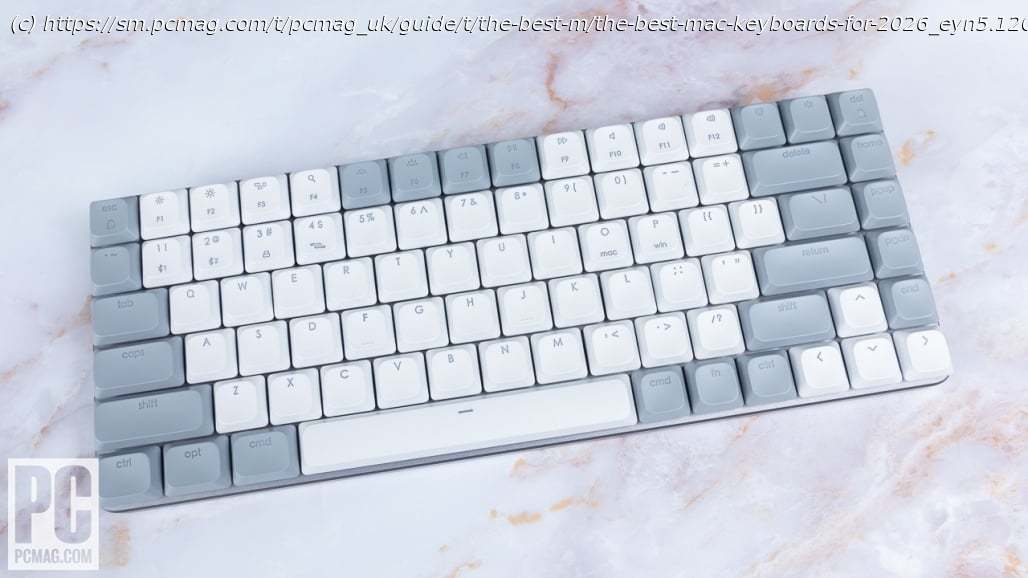
No longer spellbound by your Apple Magic Keyboard? These lab-tested Mac-compatible keyboards look and feel fantastic, and work perfectly with your iMac or MacBook.
Apple’s Magic Keyboard is compact and elegant enough, but it’s far from the only worthy keyboard option for Mac users. Maybe you write all day, play fast-paced games, or need superior ergonomics? Or perhaps you yearn for the cacophonous comfort of mechanical key switches, which Apple’s own keyboards lack? Great alternative keyboards abound, but not all of them work perfectly with Macs, so you’ll need guidance about what works—and what works well. That’s where our extensive testing comes in. Based on typing comfort, value, software customization, and the many other factors that we evaluate each Mac keyboard on, our current favorite for most users is Satechi’s SM1 Slim Mechanical Backlit Bluetooth Keyboard. We also stand behind all the Mac-compatible keyboards recommended below for more specific use cases. Check them out, plus advice on how to land the best Mac keyboard that’s—wait for it!—your type.Why We Picked It
Apple accessories are notoriously expensive, so when we find a superior product for less, we’re eager to give it its day in the sun. The $99 Satechi SM1 Slim Mechanical Backlit Bluetooth Keyboard looks the part of an Apple accessory, but it blows the Apple Magic Keyboard out of the water in terms of feel and functionality. You get satisfying and clicky keys, attractive backlighting, plenty of connectivity options, and—most important—keyboard software that’s compatible with macOS, something that’s still not as common as you’d imagine. It’s an easy recommendation and one of the best Mac alterna-keyboards you can buy.Who It’s For
People who want to ditch their Apple keyboards: This one is for Mac users who aren’t fans of Apple’s low-profile scissor switches. It trades Touch ID for comfortable key switches, exceptional build quality, and a compact design.
Budget-savvy buyers: Compared with the Apple Magic Keyboard, the SM1 Slim is an affordable alternative.Why We Picked It
You shouldn’t be ashamed to dig through the bargain bin of budget keyboards, because you just might strike gold. The affordable Kensington Pro Fit Ergo KB675 EQ TKL Rechargeable Keyboard offers all the basics, complete with a comfortable split-layout ergonomic shape and a plush wrist rest. It includes dedicated meeting buttons that make it a productivity-forward device, and onboard dongle storage for when you’re taking your keyboard on the go. Its slightly lackluster build quality is its only major drawback, but given the aggressive price, it’s one of the best budget keyboards available. Who It’s For
People looking for an ergonomic keyboard: The Kensington Pro Fit Ergo KB675 EQ TKL Rechargeable Keyboard offers some great ergonomics, thanks to its unique curved chassis, split layout, and comfortable wrist rest.
Budget-savvy buyers: For money-strapped Mac users looking for a Mac-friendly keyboard, the Pro Fit Ergo is an excellent value.
Why We Picked It
Macs and other Apple devices are renowned for their aesthetic appeal, so if you’re looking for an alternative that’s just as visually pleasing, consider the Satechi SM3 Slim Mechanical Backlit Bluetooth Keyboard. It’s a full-size mechanical keyboard, and like its TKL cousin, the Satechi SM1 Slim, it surpasses the Apple Magic Keyboard in several ways. From its clicky keys to its multiple connectivity options, the Satechi SM3 Slim is an excellent choice for those seeking a more affordable, aesthetically pleasing alternative to Apple’s own keyboard, and willing to forgo features like Touch ID. Who It’s For
People who want Apple aesthetics without the Apple price: If you’re in the market for peak functionality and aesthetics, the Satechi SM3 Slim is the keyboard for you.
People who prefer full-size keyboards: A full-size keyboard doesn’t sacrifice functionality for space. That means you get a full number pad and function keys, which makes it easier to maximize productivity.Why We Picked It
Many Logitech peripherals are platform-agnostic, meaning they support both Windows and macOS operating systems, among others. But it’s always nice to have a keyboard dedicated to your OS of choice, and that’s what the Logitech MX Keys S for Mac is: a keyboard optimized for Macs that’s not from Apple. It’s virtually identical to Logitech’s MX Keys S, which is also compatible with macOS and delivers the same functionality and performance—for the same price. In short, while it’s a capable pick, it’s not much more than a keyboard made for Mac users who can’t stand the sight of Command sharing the same key as Alt.Who It’s For
People who prefer low-profile keyboards: If you prefer a low-profile design with scissor switches instead of mechanical ones, and you don’t want to pay the Apple tax, then the Logitech MX Keys for Mac is right for you.