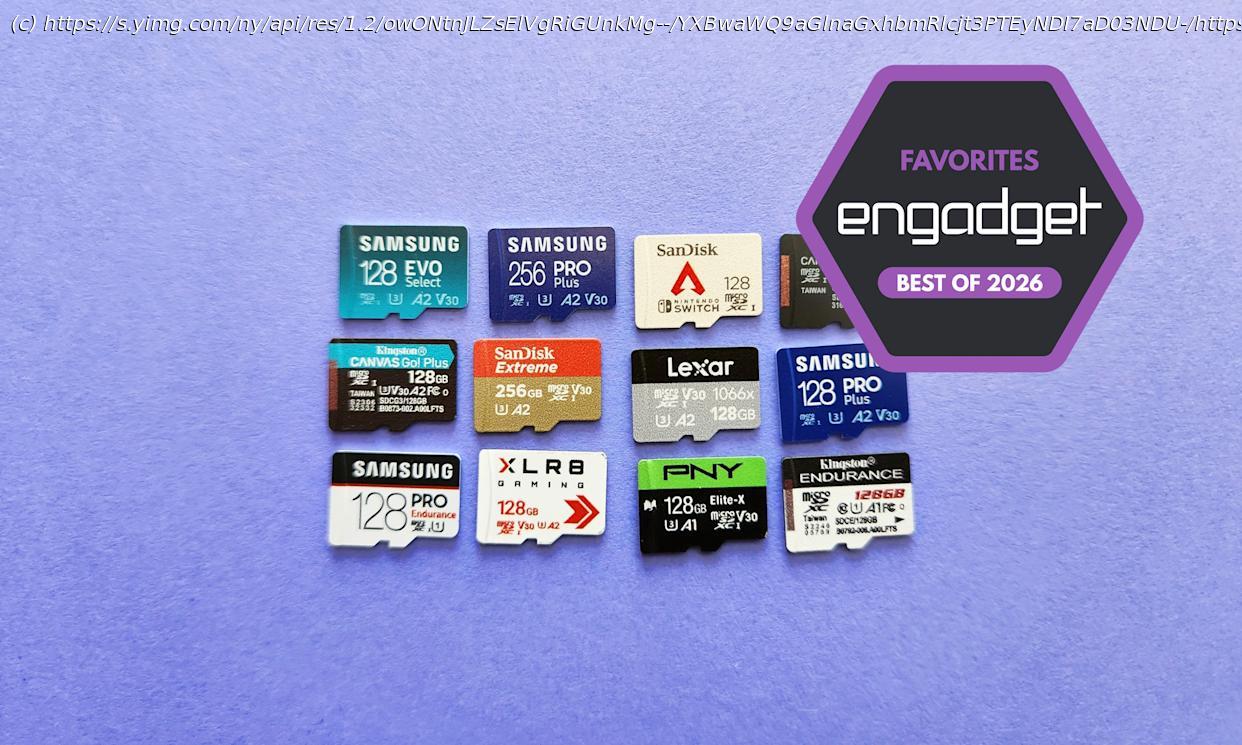
Here’s a list of the best microSD cards you can buy, as chosen by Engadget editors.
Most microSD cards are fast enough for stashing photos, recording video and transferring files, but some will get you a little more bang for your buck than others. If you’re looking to boost the storage of your Nintendo Switch 2, Steam Deck, GoPro or any other device that still accepts microSD cards, we can help. We’ve thoroughly researched the market and several cards through a suite of benchmark tests. Here are the best that we’ve tested, along with some general advice on what to look for when buying a new card.Table of contentsBest microSD cards of 2026Best microSD Express cards for the Nintendo Switch 2
Read our full guide to the best microSD Express cards for the Nintendo Switch 2
Let’s be clear about this: Unless you plan to own a Nintendo Switch 2 in the near future, you do not need a high-speed microSD Express card just yet. Nintendo’s gaming handheld is the only popular device that natively supports this standard right now, and microSD Express cards themselves are highly expensive compared to more traditional options.
Still, if you do want to increase a Switch 2’s storage, they’re your only choice. Fortunately, determining exactly which model to buy for the console is pretty straightforward: Get whichever one you can find in stock, in the capacity you want, at a price you can stomach.
We benchmarked several microSD Express cards for a separate Switch 2 guide, and for the most part, the performance differences between them weren’t great enough to justify paying extra for any particular model. Loading times weren’t quite identical with every test we ran, but the cards were extremely close in most games and common scenarios. The few times when there was a notable gap — fast-traveling to a particularly resource-heavy region in Cyberpunk 2077, for instance — the gulf between the slowest and fastest card was only ever about four or five seconds at most. That’s not nothing, but it’s also not something most people are likely to fret over unless they have a stopwatch handy.
The only time you’d notice a major speed difference is if you transfer games to your Express card from the Switch 2’s internal storage (and vice versa). In that case, the SanDisk microSD Express Card and Lexar Play Pro were generally the quickest, while PNY’s microSD Express Flash Memory Card had particularly slow write speeds.
Moving Mario Kart World to the SanDisk and Lexar models, for example, took around four minutes and 35 seconds on average; with the PNY card, it took a little over seven minutes. That said, the PNY model was the fastest when it came to moving games back to the system storage. Walmart’s Onn microSD Express Card was significantly slower to move games from the card to system storage, but it’s also the most affordable card we’ve seen by a good distance. Either way, most people aren’t constantly shuffling their games back and forth like this. Performance in actual games is more important, and in that regard the results were consistently much tighter.
What matters most is getting the most space for your budget. Unfortunately, stock for all microSD Express cards has been spotty since the Switch 2’s launch. For your convenience, we’ll list out all of the models we’ve tested thus far and their respective list prices below. Note that some lower-capacity versions — the 128GB SanDisk card, for one — advertise slower speeds than their more spacious counterparts.
Broadly speaking, we recommend getting at least 256GB of storage, as Switch 2 games tend to have much larger file sizes than games for Nintendo’s previous handheld. But we also recommend holding off upgrading for as long as you can, if only because all of these cards should (tariff shenanigans aside) come down in price as time goes on.
There’s no point in buying a microSD Express card for anything besides the Switch 2, but we did run the models above through our usual PC benchmarks as well. Unsurprisingly, they are miles faster than any traditional card on the market.
With the 256GB SanDisk card, for instance, sequential read speeds checked in just under 900 MB/s in CrystalDiskMark and ATTO, while sequential writes topped out around 650 MB/s. Sustained writes speeds were slower (around 210 MB/s), but that was still fast enough to move our 12GB test file to the card in 52 seconds on average. It took a mere 20 seconds to read the file back to our PC. The write test with our smaller 1.15GB test folder, meanwhile, averaged just 4.5 seconds.
It all adds up to performance that’s at least twice as fast as the best UHS-I models we’ve tested in terms of sequential reads and writes, with three or four times the speeds in some cases. The gulf in random reads and writes is similar, and in some benchmarks even greater. But you need a pricey SD card reader to even see those increases on a PC, so only those with a Switch 2 in hand or serious cash to burn should consider one of these things.Other notable microSD cards
The Samsung Pro Ultimate was the closest competitor to the Lexar Professional Silver Plus across our benchmark tests, but it’s tangibly worse in terms of sequential write speeds, typically costs more and doesn’t offer a 1TB option. The Samsung Pro Plus is a bit slower for sequential reads, but it’s close enough otherwise and usually easier to find at a lower price.
We haven’t used it ourselves, but if you’re willing to pay for a more powerful UHS-II card built for heavy-duty video recording, the Lexar Professional Gold has tested well elsewhere and should deliver significantly faster sequential write speeds than our UHS-I picks above. It’s one of the few UHS-II cards we could actually find in stock, but it’s pricey, with a 128GB model normally priced in the $35 to $40 range.
The SanDisk Extreme effectively matched the Pro Plus in a few of our sequential tests, but that was partly due to us only being able to secure the 256GB model, which is higher-rated than the 128GB version. It’s a fine choice if you see it on sale at a reputable seller, but it’s broadly slower than our top pick and often costs more.
The SanDisk GamePlay performs similarly to the SanDisk Extreme but costs a good bit extra as of our latest update. We couldn’t get it to reach its advertised speeds with the company’s own “Pro” card reader or other third-party options, so it fell short of our top picks.
The SanDisk Pokémon does outperform its advertised read and write speeds, but not by enough to outpace the Lexar Silver Plus or Samsung Pro Plus. It essentially charges extra for having a picture of Pikachu (or Gengar, or Snorlax) on a product you’ll never look at.
The SanDisk Extreme Pro is a close analog to the Samsung Pro Ultimate but, as of this writing, is either unavailable at most trusted retailers or priced too high by comparison. The Lexar Professional Silver Plus has faster sequential write speeds as well.
The PNY XLR8 is an affordable card that comes with up to 512GB of space. Its sequential and random writes speeds checked in a little bit above those of Samsung’s Evo Select, plus it comes with a lifetime warranty. But its sequential reads were much, much slower, putting it out of contention.
The PNY Elite-X often goes for cheap and wasn’t too far off the random read/write performance of Samsung’s Pro Plus in CrystalDiskMark. Like the XLR8, it’s also slightly above the Evo Select in write speeds. But its sequential reads were too far behind all of our top picks, and it no longer appears to be available in capacities above 256GB.