If you feel like you aren’t managing your tablet time to the best of your abilities, there are apps that can help with that. Here are 16 of our favorites.
Over the past few years, Apple has made some drastic changes to the iPad’s hardware and software, making it more lucrative than ever. Powerful M series chips, tandem OLED displays, a new massive size, and an OS that’s closer to macOS than ever. Right from the base iPad 11th gen to the flagship M4 iPad Pro, Apple offers solid products at various price points. With some iPad accessories and pro-grade software like Final Cut Pro and Logic Pro, it’s natural for students, artists, and even video editors to consider using an iPad as a laptop replacement. If you were also enticed into picking up an iPad, there’s a treasure trove of apps that let you unlock the tablet’s full potential.
Apps like Procreate, LumaFusion, Lightroom, and several other free apps are just scratching the surface of what the iPad can do. Whether you’ve just bought a brand-new iPad or you have one gathering dust that you want to resurrect, we’ve collected a bunch of apps that will drastically improve your tablet time in 2026. These are apps that can boost your productivity, perform tasks that you would otherwise need dedicated tools for, and even simplify a host of tasks on the iPad by adding features that Apple didn’t include natively. I’ve tested hundreds of iPad apps, and here are the ones I believe are going to make you appreciate your iPad even more.Paste – Limitless Clipboard
One of my biggest gripes with iOS and iPadOS is the lack of a native clipboard. For those unaware, the clipboard on any device stores all your copied elements. For instance, if you copy a phone number, it stays in the clipboard until you paste it. With iPadOS, you can only copy one item at a time. If you copy two phone numbers, the one copied earlier will be lost. If you edit a lot of documents on your iPad or repeatedly input recurring details like addresses, email IDs, etc., this can be extremely annoying.
Thankfully, there are third-party apps to fix this issue. Paste is one such app that has worked well for me. As soon as you copy anything on your iPad, Paste will store it within the app. This way, anything you copy is available to paste without overwriting previous copies. While the trial version is free, you will have to pay to unlock the app’s full potential. If you copy-paste a lot of items daily, the full version is absolutely worth it.Defter Notes
I know, there are a plethora of note-taking apps for the iPad — way more than anybody asked for. But one app that stands out is Defter Notes. Unlike traditional note-taking apps that have multiple pages, folders, and sections, Defter Notes provides a limitless canvas to scribble on. This is an excellent way to generate ideas and jot down quick pointers. You can then map each individual element based on your requirements. So, you can have text, pictures, files, sticky notes, and pretty much any sort of media related to your idea.
Of course, the usual set of features, like the ability to change the tip size and color, erase text, and add or remove gridlines to the page, are present. Defter Notes isn’t for students or professionals who like making organized notes during a class or a meeting. It’s more of a tool directed towards creatives or business owners who want to brainstorm ideas and create a mind map — all in one place.ReciMe
How many times have you come across delicious recipes when scrolling through TikTok, Instagram, YouTube, or pretty much any other social media app? The usual behavior when you encounter a recipe you want to try later is to take a screenshot of the video. More often than not, you tend to forget about the screenshot in a few days. Well, that’s about to change, thanks to ReciMe — a service that you can you to create your own repository of recipes from the internet.
Let’s say you’re scrolling on TikTok and watch a video that shows you how to make banana pancakes in under five minutes. Instead of taking a screenshot of the ingredients list, all you have to do is hit the Share button and choose the ReciMe app. The app will extract the recipe from the video so you can view it whenever you want. Simply open the ReciMe app every time you wish to view a recipe. You can also create folders for different types of recipes, and also view the calorie count of each dish.AUM Audio Mixer
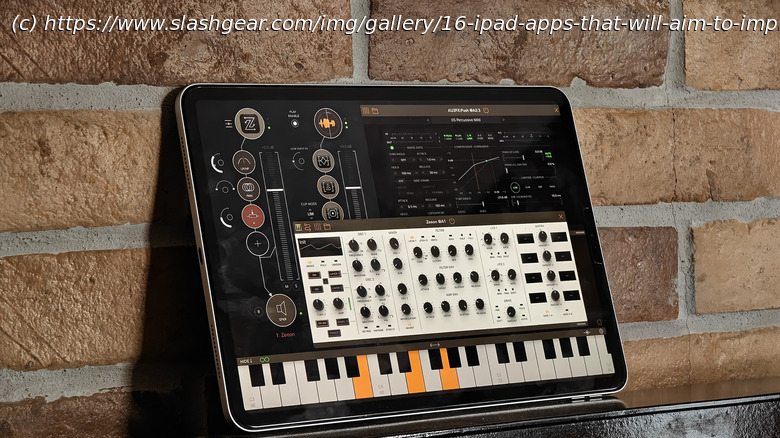
The AUM Audio Mixer app is exactly what it sounds like. If you work with a lot of audio files, for instance, in a podcast or filmmaking setup, AUM gives you complete control over pretty much any parameter related to your audio file. Notably, AUM lets you work with external devices by connecting them to the iPad and creating multiple audio channels. So, you can connect multiple external mics for audio input along with a bunch of headphones for monitoring the output.
You can also use the built-in keyboard or connect external musical instruments. Once the audio files are recorded, you can also edit them within the app itself using an interface that’s rather straightforward. Notably, AUM is not a free app. However, if your job involves working with and processing audio files on the go, AUM is an excellent investment. It also works on an iPhone, so you can make small tweaks in quick time, even if you don’t have your iPad with you.FileBrowser Professional
Apple has definitely improved the file system on the iPad to a point where most people are now comfortable using the Files app. However, if you’ve used Finder on a Mac, you would know that the Files app on the iPad lacks a ton of features — especially for power users. That’s exactly what FileBrowser Professional aims to fix.






