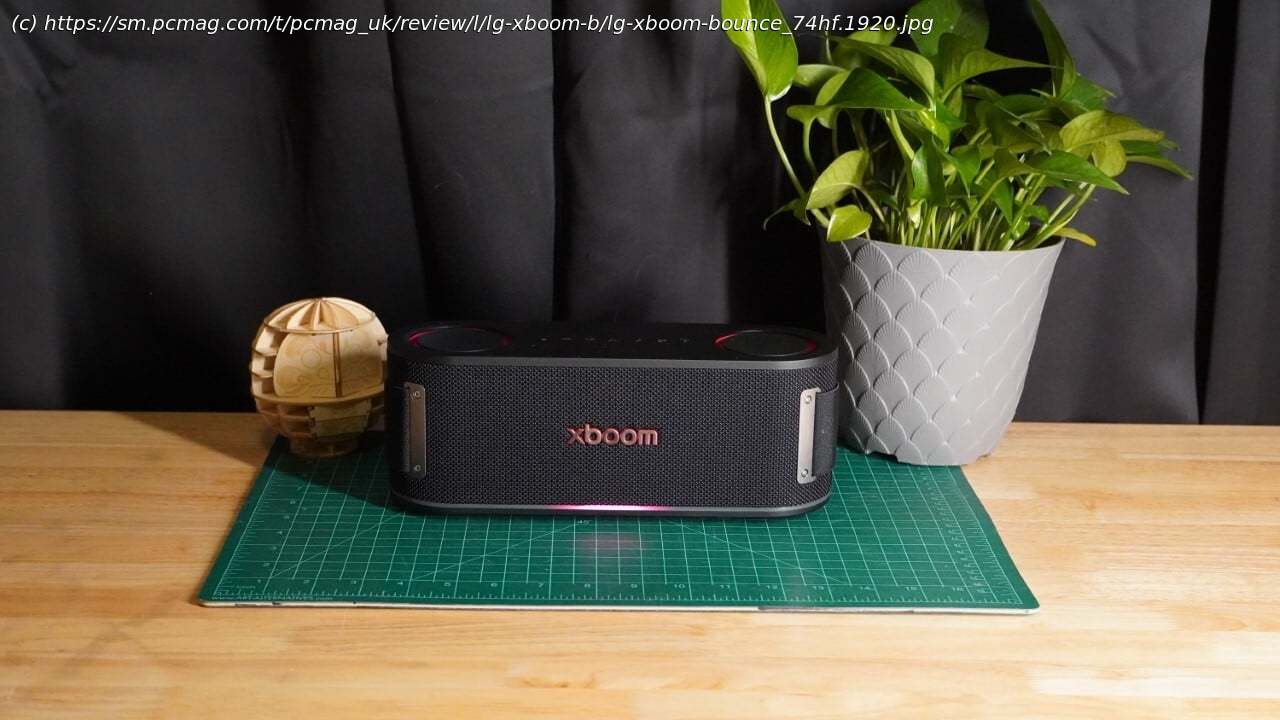
A compact speaker in a tight spot
The $199.99 LG Xboom Bounce sits in the middle of the company’s revamped and narrowed line of portable Bluetooth speakers. Designed in collaboration with artist will.i.am, the Xboom Bounce delivers balanced audio with impressive range and volume. We like its compact size and light weight, which make it easy to carry around, as well as its durability, decent battery life, and nifty light show. It’s held back by limited codec support, a frustrating companion app, and a weak microphone, all of which lead us to recommend the Editors’ Choice-winning Edifier D32, which has better sound, multiple audio inputs, and can run on wired or battery power, for the same price. Design: Subtly Elegant
The LG Xboom Bounce diverges from the style of earlier LG Xboom speakers. It still carries some of the red and black accent coloring, but otherwise presents a unique shape and swaps out the all-caps “XBOOM” logo for an all-lowercase “xboom” one. The new design is almost pill-shaped but has a flat top and bottom, giving it much simpler geometry than LG’s older Xboom speakers.
Two metal plates on either side of the front edge give the Xboom Bounce an industrial look. An elastic band that connects the plates and wraps tightly around the back of the speaker acts as a carry handle or can be used to hang it. The speaker is easy to carry even without the handle, as it weighs 2.9 pounds and measures 3.9 by 10.3 by 3.7 inches (HWD). The strap deforms somewhat easily and feels like it’ll show wear and tear long before any other element of the speaker, but at least it’s replaceable. The speaker otherwise feels quite sturdy and has an IP67 rating, so it should survive minor drops, most dust, and significant splashes of water.
The speaker is a composite of several different materials. The top is coated in a soft-touch plastic. The bottom has a removable, ribbed plastic cover that provides access to a replaceable battery, which is novel for a Bluetooth speaker. Two circular rubber feet stand it up and absorb vibrations. A small light-up strip wraps around the entire base of the speaker, though it only illuminates the front edge. Above that, the speaker is covered almost entirely in a textured mesh material. A thin spine at the back of the speaker splits that mesh and houses a USB-C port, the speaker’s sole wired connection.
Two passive radiators sit on either side of the Xboom’s top panel. A row of physical controls is lined up between them. They’re a little hard to see, given they’re black buttons on a black background. They include power, volume, and play/pause controls; a Bluetooth pairing button; a Party Link button; and a small heart-shaped My Button that changes the lighting and summons music from your phone, based on user-assigned settings.
The Xboom Bounce combines a pair of tweeters and a single racetrack woofer. LG, somewhat ambitiously, considers this a 2.1-channel setup. The drivers are tucked safely away behind the front mesh cover. The woofer measures 3.66 by 2.08 inches, but LG doesn’t specify the size of the tweeters, nor does it list the speaker’s frequency range other than to say « 20,000Hz. » It supports Bluetooth multipoint, works with both AAC and SBC codecs, and includes a microphone to power speakerphone functionality.
Inside, the Xboom Bounce features a 4,700mAh battery that can power the speaker for up to 30 hours at 50% volume, with the lights off and Voice Enhance mode enabled. It can be fully charged in approximately three hours. With the Standard sound mode and lighting enabled, the speaker lasted approximately 20 hours during testing. LG allows the speaker to charge external devices via its USB-C port, enabling it to serve as a secondary power source.
LG includes a USB-C cable and the strap, but that’s it as far as accessories go; you’ll need to supply your own charger.App: Asks for Too Much Personal Info
Confusingly, the Xboom Bounce does not use the Xboom app. Instead, it requires LG’s ThinQ app, which is compatible with Android and iOS devices. Where the old Xboom app didn’t require an account, the ThinQ app does; it wants your email address, name, and birth date. It requests a phone number, but providing one is optional. The app also requires precise location access to pair with a speaker, even when it has already been connected to your phone via Bluetooth—it won’t automatically recognize the speaker. Instead, you must manually add a device, navigate the numerous product categories the ThinQ app supports, and then select the speaker category and choose the Xboom Bounce. It’s a tedious process. This seems an egregious amount of personal data to supply to LG just to use a Bluetooth speaker.
The first time you open the ThinQ app, it asks for your favorite musical genres and podcast topics, as well as your time zone and city (information you might think it could determine from your shared precise location data).
To customize the My Button feature, you’ll need to grant additional permissions, including access to media on the connected device (even if you only want to use LG Radio) and unrestricted battery settings. It will also frequently request permission to send you notifications. Using My Button, you can set the Xboom Bounce to begin playing specific content, switch to a specific lighting and audio setting, or begin a sleep timer, so perhaps some of these requests make sense.
The app has several options for customizing the sound. It features four preset sound effects, one of which is built on AI-based genre analysis, and provides a custom six-band EQ with ±6dB adjustments. Additionally, it can perform a room analysis and attempt to optimize the sound for the listening environment.
You can customize the speaker’s lighting, set up Party Link speaker groups, and search for Auracast broadcasts to connect to, though you cannot set the Bounce as an Auracast source.
If you’re in the LG ecosystem, it might be convenient to have one app for multiple devices, but for use with a Bluetooth speaker, the ThinQ app requires a lot. Thankfully, you can access many, but not all, of the speaker’s basic features without the app. Sound Quality: Punchy With a Narrow Sweetspot
I used the Standard EQ preset to test the audio quality of the Xboom Bounce, which is probably for the best, because the AI Sound preset, which claims to analyze the genre in real-time for optimal sound, led to inconsistent results in testing. The Voice Enhance preset, meanwhile, sounds poor when playing music, and the Bass Boost preset only adds a subtle shift toward the low end.
The Xboom Bounce has the right sonic qualities for some party music. On The Knife’s track “Silent Shout,” the bass triplets and deeper sub-bass quarter notes sound weighty and propulsive without drowning the mids and treble. At 50% volume, the speaker provides reasonable listening levels for a 150-square-foot room or small outdoor gathering, but it really comes into its own when pushed a bit louder. At low volumes, the upper-mids and treble lack bite and presence, leaving the audio feeling flat. The upper-register harmony is simply hard to pick out at lower levels. At 60%, these notes start to ring out better. The soundstage is a bit crowded, so some subtler elements, like the metal chime, get lost. The limitations of AAC are subtly evident here, with some compression artifacts appearing during the decay of certain claps and cymbal hits.
Kendrick Lamar’s “Loyalty” reveals some of the speaker’s limits. This track pushes deep into sub-bass territory with a line that rises around the 35-second mark. Surprisingly, the speaker renders all but the lowest of these notes. There’s some roll-off, though, so as the notes leap up and down in frequency—the speaker can go from a mellow note to a hiccup-like loud note—a common issue for speakers trying to tackle this sub-bass line. The rest of the track sounds quite clean, with the Bruno Mars sample sounding crisp and vocals loud and clear.
The speaker performs impressively with Bill Callahan’s “Drover.” His baritone vocals are loud and central and aren’t overwhelmed by the rest of the mix. Even though the speaker doesn’t have the clear stereo separation required to really let the electric guitar and fiddle sit on the outer edges of the mix, it manages to present them distinctly, something mono speakers struggle with. Still, the expansiveness of the track is somewhat lost due to the narrow soundstage. The drums have a significant bite to them, especially the cymbals and rimshots, although they sound somewhat compressed.
The speaker performs admirably with orchestral music, such as John Adams’ The Gospel According to the Other Mary. Low bass notes don’t overwhelm the rest of the instruments or drown out the vocals, which remain clear throughout. The chaotic instrumentation of the opening track is hard to keep up with; however, compression and weak stereo separation make the speaker sound muddled.
While the drivers can produce considerable volume, the quality of the highs sinks at peak levels. The bass is restrained as it pushes past 80% volume, resulting in a harsh quality when the volume is cranked to its maximum. Between that and the speaker sounding bland at low volumes, it ends up with something of a sweet spot between 60% and 80% volume.
The microphone is somewhat disappointing. Even at a close distance in a quiet room, it exhibits strong processing artifacts. It sounds like it’s trying to pick up a distant voice in a noisy environment and then enhance it. I could make out what I was saying in a test recording, but it wasn’t pleasant to listen to.
That mic has a second function: Helping the ThinQ app analyze the environment and adjust the sound. After running the optimizer, I didn’t notice a difference in the sound. However, it could be helpful in certain scenarios, such as when the speaker is positioned in a semi-enclosed area where there might be sonic reflections.