These five work-from-home gadgets solve everyday problems like poor ergonomics, limited ports, messy desks, bad audio, and power protection.
Working from home is a double-edged sword. On one hand, you retain full access to the creature comforts of home — access to one’s own, private bathroom is arguably better than a 401K, to say nothing of zero commute time. On the other hand, it’s up to you to furnish the experience. Working from your couch feels freeing at first, but once your wrists begin to cramp, a proper workstation is the only solution. From there, it’s one problem after another, and one gadget after another to solve them.
As a freelance writer who often covers tech, my home office is something of a constant work in progress. I’m almost always testing one or more products that claim to make my life easier, though very few of them make good on that promise. Here, I’ve rounded up some of the best gadgets that leveled up my work-from-home setup, taking into account my own experiences with them, as well as those of other users. Beyond sprucing up your home office, these gadgets are a value add day-to-day. From tech that will reduce the strain of work on your body to those meant to protect your gear, here are just a few of my favorite work-from-home gadgets that solve everyday problemsAn ergonomic mechanical keyboard will reduce wrist and hand strain
If your job requires a lot of typing, whether it’s writing code or penning articles like this one, you’ll quickly realize that a mechanical keyboard is essential. Even laptop users will benefit from a more professional typing tool. Not only is a keyboard a great productivity-boosting gadget, but long typing stretches are not great for your hands and wrists. Over time, you can develop conditions like carpal tunnel, which are painful. For those reasons, it’s worth trying to adjust to an ergonomic keyboard.
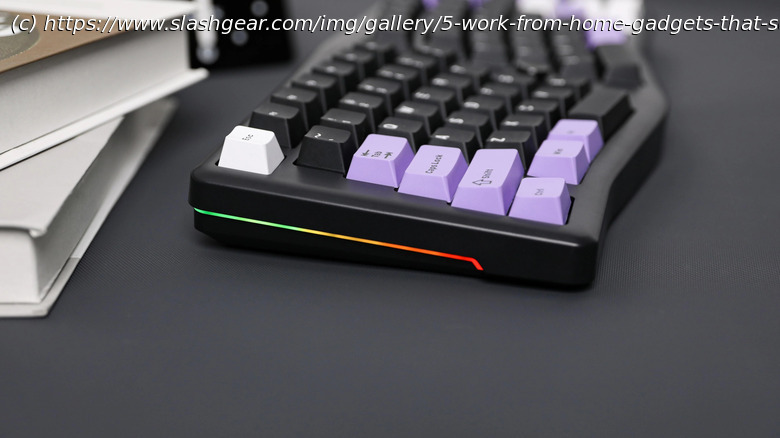
My favorite ergonomic, mechanical keyboard is the LeoBog A75, an Alice-style keyboard with a 75% layout (meaning no number pad). Its hefty, solid build belies its plastic chassis, and the typing experience is confident but not harsh. There’s enough padding and flex that you won’t feel a hard bottom-out on the keys. Enthusiasts would describe it as having « creamy » acoustics, which means that it doesn’t have the traditional, « clacky » sound commonly associated with mechanical keyboards. It supports wired, Bluetooth, and 2.4GHz connections, with separate modes for Windows and macOS. Software is its weakest point, but the LeoBog application does a decent job of customizing keybinds and lighting (oh yeah, there’s RGB, if you’re into that). This is the keyboard I mostly keep on my desk unless I’m testing another one, or want to switch things up for a bit.
When I’m on the go, working from coffee shops or airport lounges, I break out my trusty NuPhy Air75 V2, a low-profile mechanical keyboard with all the same features as the LeoBog A75, but slim enough to fit in a backpack or tote (though it is not a split-layout ergonomic keyboard). The updated Air75 V3 is out now, but I have not tested it.Get a surge protector, especially if yours is old
If you work from home, it’s unlikely that you’re able to plug everything you need into a single outlet.