This new AI «desktop» from HP hides in plain sight, with a design that takes inspiration from classic computers like the Commodore 64 or VIC-20. I got the chance for an extended first look at it before CES 2026.
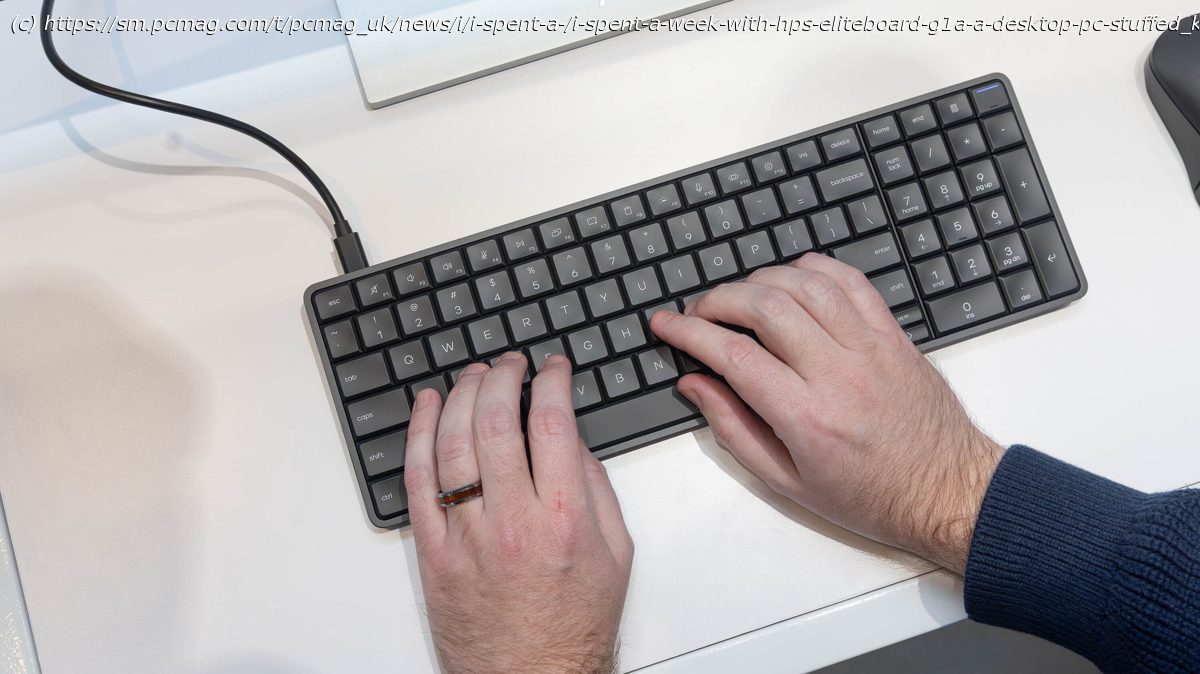
Just announced at CES 2026, the HP EliteBoard G1a is totally unlike any other laptop or desktop PC I have seen in decades—mainly because it’s neither. HP has employed laptop components to integrate a full-fledged AI PC into the body of a compact keyboard, creating a unique modern desktop, reminiscent of retro systems like the Commodore 64 or VIC-20. The EliteBoard appears to be a stylish, minimalist desktop keyboard to the world, but it packs real power into its sleek confines.
The big question: Why do this? The EliteBoard is designed for the modern office, where hot-desking and hybrid work make the portability of a laptop a priority. But let’s be honest: Some business laptops seldom get opened. Instead, they run much of the time with the lid closed, plugged into a full-size keyboard and a desktop monitor in both your home office and in your in-office workspace. That wastes the battery-powered portability the laptop provides, while often ignoring whatever high-quality display might be attached at the hinge.
HP’s first EliteBoard simply ditches the lid and the built-in display, turning the keyboard itself into a portable desktop PC of sorts. Here’s what I think of it after a week with a production model, ahead of my visit to CES 2026.A Low-Profile Design, and Quiet Typing
The EliteBoard features a minimal, low-profile design, and its metal-and-plastic chassis weighs just around 1.5 pounds (1.6 pounds for HP’s model with an optional battery; more on that in a bit). The unit’s two-layered setup puts the keyboard on top—this portion is removable and replaceable for IT departments to service as needed—while the bottom half of the chassis houses the motherboard and PC components. (Given that it’s a keyboard at heart, you don’t want to have a broken key take your whole desktop out of commission for good.) Inside, you get easy access to memory, SSD storage, the WLAN card, speakers, fan, and battery, making the system surprisingly serviceable.
The underside of the keyboard is nicer-looking than most and is perforated for ventilation.