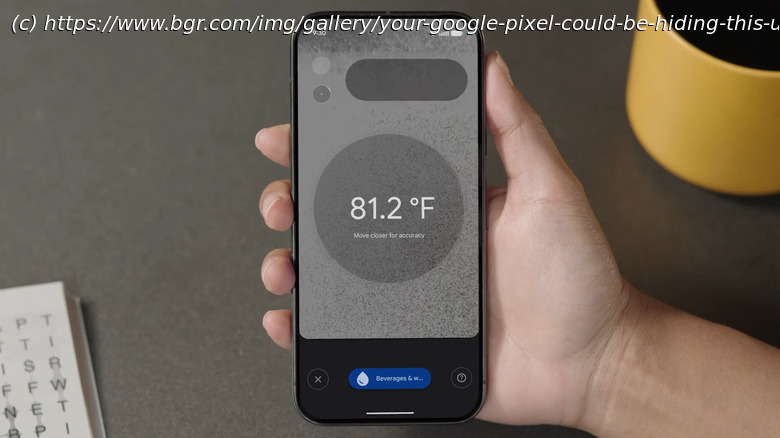
The Google Pixel lineup of smartphones, particularly recent XL and XL Pro models, are able to utilize a built-in temperature sensor as a thermometer.
Digital thermometers are one of many underrated and cheap gadgets to have on hand. They’re generally reliable and undoubtedly essential when you’re monitoring ill individuals. But what if you only want to do a quick fever check, or see how hot your desktop computer is? Whipping out the thermometer every time can be quite inconvenient, especially if you’re out of the house and forgot to pack one.
Fortunately, you can now measure the temperatures of objects — as well as body temp — on demand. All you need is a gadget that typically never leaves your sight: your phone, specifically a Google Pixel Pro. If you have a Pixel 8 Pro, Pixel 9 Pro, Pixel 9 Pro XL, Pixel 10 Pro, or Pixel 10 Pro XL, you might have noticed an extra sensor on the camera bar at the back. That’s the temperature sensor, which pairs with a pre-installed Google app fittingly called Thermometer.
The Pixel’s Thermometer app can come in handy for casual use, or when you’re in a pinch. And while it won’t replace traditional thermometers for medical use (including this one from QuickCare), it’s still a convenient tool to have. We’ll walk you through how to take temperature readings with your Pixel phone and how to troubleshoot the app if you run into any issues.How to use your Google Pixel’s temperature sensor
The Pixel’s Thermometer app is pretty intuitive and straightforward, so it should be easy to get the hang of it. Here’s how you can start measuring temperatures with your Pixel phone:
Launch the Thermometer app.
When prompted, tap Allow to give the app permission to use the built-in infrared temperature sensor and camera.






