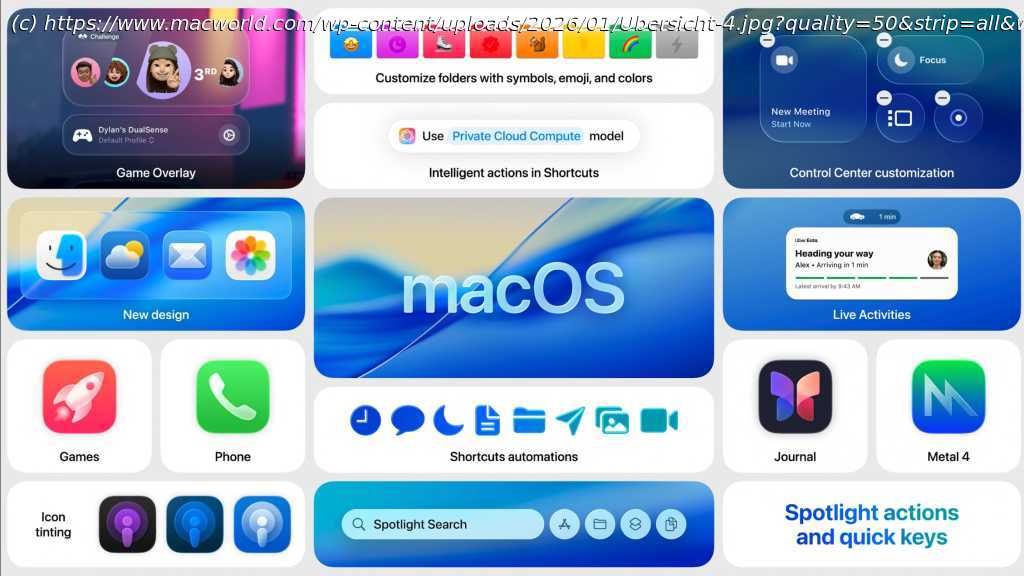
All the features in macOS 26 Tahoe, which Macs are compatible, problems, what’s in macOS 26.2, and what’s to come in the next release – macOS 26.3.
In summary:
Macworld reports that macOS 26 Tahoe, released September 15, 2025, introduces the biggest design overhaul since 2013 with its new “Liquid Glass” interface featuring transparent elements and reflective effects.
The latest version 26.2 adds Edge Light for improved webcam quality, Live Translation across calls and messages, and enhanced AI-powered Shortcuts automation exclusively for M-series Macs.
Tahoe marks the final macOS version supporting Intel Macs, with version 26.3 beta currently available and full release expected early 2026.
Like its counterparts on the other Apple devices, in September 2026 macOS got a brand new look along with a new name. Because Apple is aligning the names of all the operating systems this year, the new version of macOS is called macOS 26 rather than macOS 16. It also takes the name Tahoe, inspired by the lake, beaches, and the ski resorts of that area of California.
Along with a big redesign, macOS 26 brings new Continuity features to bring your iPad, iPhone, and Mac even closer together, a brand new Phone app, and more. Spotlight also gets its biggest ever update with the ability to action things like sending emails directly from Spotlight.
Those with compatible Macs have been able to install macOS Tahoe since it was released on September 15, 2025. If you haven’t yet, read on to find out how to do so, whether you can, and whether you should.
macOS Tahoe might have launched, but Apple is continuing development with new features being added every couple of months. You can get a first look at the new upcoming features via Apple’s developer and public betas, which are available to download if you join the beta program (we explain how to do so below).
You will find all the things you need to know about macOS Tahoe and all its new features below, including which Macs are compatible with macOS 26 and the new features you can expect, including what’s been added since the September launch, and what’s coming in the next update. Stay tuned to this superguide for everything you need to know about macOS 26 Tahoe. macOS 26 Tahoe: Summary
The new version of macOS, called macOS 26 Tahoe, was released on September 15 2025. Some M3 Mac Studio users were encountering issues and unable to install the update, but the macOS 26.0.1 update addressed this issue. The current version is macOS 26.1.
macOS 26 Tahoe is still being developed and you can access new features before they are launched via the Developer and Public Betas.
Tahoe runs on Macs released since 2019. It runs on all M-series Macs, but it runs on a small number of Intel-powered models. Apple has confirmed that macOS Tahoe will be the last macOS version to support Intel-powered Macs; from macOS 27 Intel Macs will not be supported.
With its new Liquid Glass interface, macOS 26 has its biggest design change since 2013.
New features in macOS Tahoe include more options for personalization, improvements to Spotlight and Shortcuts app, and the introduction of a Phone app on the Mac and all the associated features. macOS 26 Tahoe latest version
Latest version of macOS is macOS Tahoe 26.2, which arrived on December 12, 2025
Apple released the first version of macOS 26 Tahoe on September 15, 2025. The release coincided with the iOS 26 update. Since then the following updates have been issued by Apple.
macOS 26 – September 15, 2025
macOS 26.0.1 – September 29, 2025 (bug fixes)
macOS 26.1 – November 3, 2025
macOS 26.2 – December 12, 2025
Wondering whether to install macOS Tahoe? Read: macOS Tahoe vs macOS Sequoia: What’s different, what’s new, and should you update?macOS 26 Tahoe next update: macOS 26.3 release date
Current beta is macOS Tahoe 26.3, full version likely to launch towards the end of January or in early February 2026.
Development continues even after the official macOS update is released, as Apple seeks to introduce new features that missed the initial introduction date. Apple is running a developer beta as well as a public beta so that upcoming new features can be tested.
The macOS Tahoe 26.3 beta arrived on December 15, there have been updates for developers and public testers since.
Both betas are free, though the developer beta requires a free registration as a developer. Apple issues updates to the betas fairly regularly. The public beta updates tend to come a day or two after the updated developer beta. If you are interested in trying out the beta, you can join Apple’s beta program. For help installing the macOS beta, see our guide to installing the macOS beta.What’s coming in macOS 26.3
macOS Tahoe 26.3 is currently in active development and testing.
This update continues the refinement of the major features introduced with the initial launch of macOS 26 Tahoe. It’s not yet known what new features are coming, however in iOS 26.3 there are a number of EU-mandated changes coming. Read our iOS 26 guide for more information. What’s new in macOS 26.2
macOS Tahoe 26.2, released in late 2025, introduced several specialized updates focusing on video conferencing enhancements, AI development tools, and hardware-specific performance boosts. While it was not considered a massive overhaul, it brought a few “genius” utility features that improved the daily user experience, particularly for those working in remote or low-light environments.
Edge Light: The most prominent consumer-facing feature in macOS 26.2 is Edge Light, a virtual ring light designed to improve webcam image quality. It places a bright white border around the display to mimic a selfie ring light, significantly improving visibility in dark rooms. It uses the Neural Engine to detect the user’s face for appropriate light adjustment and can even detect the cursor to hide the light when it might interfere with navigation. Users can adjust the intensity of the light and choose between warmer or cooler color temperatures. It requires an M-series Mac, but on M4 Macs and later, the feature can be set to enable automatically when low light is detected .
AI and Developer Enhancements: For developers and power users, macOS 26.2 introduced significant updates to machine learning frameworks and hardware clustering. Developers using the open-source MLX framework can now leverage the Neural Accelerator in the M5 chip. The update enhanced the ability to create AI clusters using the Mac Studio’s Thunderbolt 5 connectivity.
Security Updates: Critical patches for vulnerabilities, aligning with security fixes found in iPadOS 26.2.
Interface Polish: Continued refinement of the “Liquid Glass” UI, which introduced more translucency and visionOS-style effects across the system.
Performance: General “under-the-hood” changes to improve system stability and responsiveness . What was new in macOS 26.1
The macOS 26.1 update includes fixes for problems with games controllers and some other issues.